Key Differences Between Mint and Ubuntu You Should Know

Choosing between Linux Mint and Ubuntu can shape how your computer feels every day. Both are popular Linux distributions, but they take different approaches to the desktop. Mint offers a familiar layout that feels comfortable for many Windows users, while Ubuntu uses a cleaner GNOME-based interface with its own workflow. The choice matters because your operating system affects performance, software access, updates, security, and how easily you can get things done.
A common point of confusion is assuming that Mint and Ubuntu are almost identical because Mint uses an Ubuntu base. They share plenty of software and technical foundations, yet the user experience can be quite different. In my opinion, that difference is where the real comparison begins. A computer with modest hardware may feel better with Mint, while a newer system or a development machine may make Ubuntu a more natural fit. Your habits matter too.
This guide breaks down Mint vs. Ubuntu in practical terms. You’ll see how the two compare for beginners, older PCs, gaming, work, programming, security, software management, and updates. You’ll also learn where each system has an edge and where the difference is small enough that personal preference should decide. By the end, choosing between them should feel much simpler.
First, it helps to understand what each distribution is trying to offer. From the desktop layout to hardware demands and long-term support, small differences can change the experience. So, before installing either one, let’s look at what makes Mint and Ubuntu different and which type of user each system suits best.
Linux Mint vs Ubuntu: Quick Comparison
| Feature | Linux Mint | Ubuntu |
|---|---|---|
| Based on | Ubuntu | Debian |
| Main desktop | Cinnamon | GNOME |
| Beginner friendly | Excellent | Excellent |
| Windows-like experience | Excellent | Good |
| Performance on older PCs | Usually better | Depends on desktop and hardware |
| Software availability | Excellent | Excellent |
| Hardware support | Very good | Excellent |
| Long-term support | Yes | Yes |
| Gaming | Very good | Very good |
| Customization | Excellent | Very good |
| Package management | APT + GUI tools | APT + GUI tools |
| Flatpak | Built in | Available |
| Snap | Not installed by default | Built in |
| Enterprise use | Less common | Very common |
| Server version | No main Mint server edition | Yes |
| Best for beginners | Mint | Ubuntu |
| Best for enterprise | — | Ubuntu |
| Best for older hardware | Mint | Ubuntu flavors may be better |
| Best for traditional desktop | Mint | — |
Both distributions are based on mature Linux technologies, but they have different goals and desktop experiences.
For another overview of the main desktop, package management, update, and hardware differences, readers can also review this Linux Mint vs Ubuntu comparison.
What Is Linux Mint?
Linux Mint is a free Linux-based operating system aimed primarily at desktop and laptop users. It is built to provide a straightforward desktop experience with many common applications and tools available after installation.
The current Linux Mint 22.3 release, called Zena, is available in Cinnamon, MATE, and Xfce editions. Cinnamon is the main edition and is developed around the traditional desktop layout many Windows users already understand.
The desktop includes a panel, application menu, system tray, taskbar-style window management, and familiar file-management tools. That layout can reduce the adjustment period for someone moving from Windows.
Mint also places a strong focus on practical desktop utilities. Its software manager makes application installation accessible without requiring users to work from the command line for routine tasks. Tools such as Update Manager and Timeshift are also part of the broader Mint experience.
Linux Mint’s current 22.3 series is based on Ubuntu’s Noble package base and receives long-term support through 2029.
For older computers, Mint also provides Xfce and MATE editions. These desktops generally require fewer resources than Cinnamon, making them worth considering when a computer has limited memory or an older processor.
2. What Is Ubuntu?
Ubuntu is a popular Linux distribution developed by Canonical. It is available for desktops, laptops, servers, cloud systems, and other types of hardware. For desktop users, Ubuntu provides a polished Linux environment with a large software ecosystem and strong hardware support.
The current Ubuntu 26.04 LTS desktop release uses the GNOME 50 desktop environment and Linux kernel 7.0. Canonical lists a 2 GHz dual-core processor, 6 GB of system memory, and 25 GB of storage as the recommended minimum for the desktop release.
One of Ubuntu’s biggest advantages is its large user and developer community. Because Ubuntu is widely used, many software developers create installation instructions, packages, documentation, and troubleshooting guides specifically for it. That can make finding help much easier when something goes wrong.
Ubuntu also uses the APT package system and supports Snap packages. Its App Center provides a graphical way to install many applications, while advanced users can manage software through the terminal.
Long-term support is another major reason people choose Ubuntu. Ubuntu releases a new LTS version every two years, and the current 26.04 LTS release receives standard security and maintenance support through May 2031. That makes it a strong option for users who want to keep the same major release for several years.
The Ubuntu desktop looks different from Mint. GNOME uses a more modern workflow, with an application overview and workspace system rather than the traditional Windows-style desktop used by Mint Cinnamon. Some people love that approach. Others prefer the familiar layout of Mint.
So, when comparing Mint vs Ubuntu, Ubuntu is often the better match for someone who wants a modern desktop, broad hardware and software support, and a system with a large technical community behind it.
Also view: iTerm2 vs Ghostty: Which Terminal Is Better for Mac Users?
Mint vs Ubuntu: What Is the Difference?
The biggest difference between Mint and Ubuntu is the desktop experience.
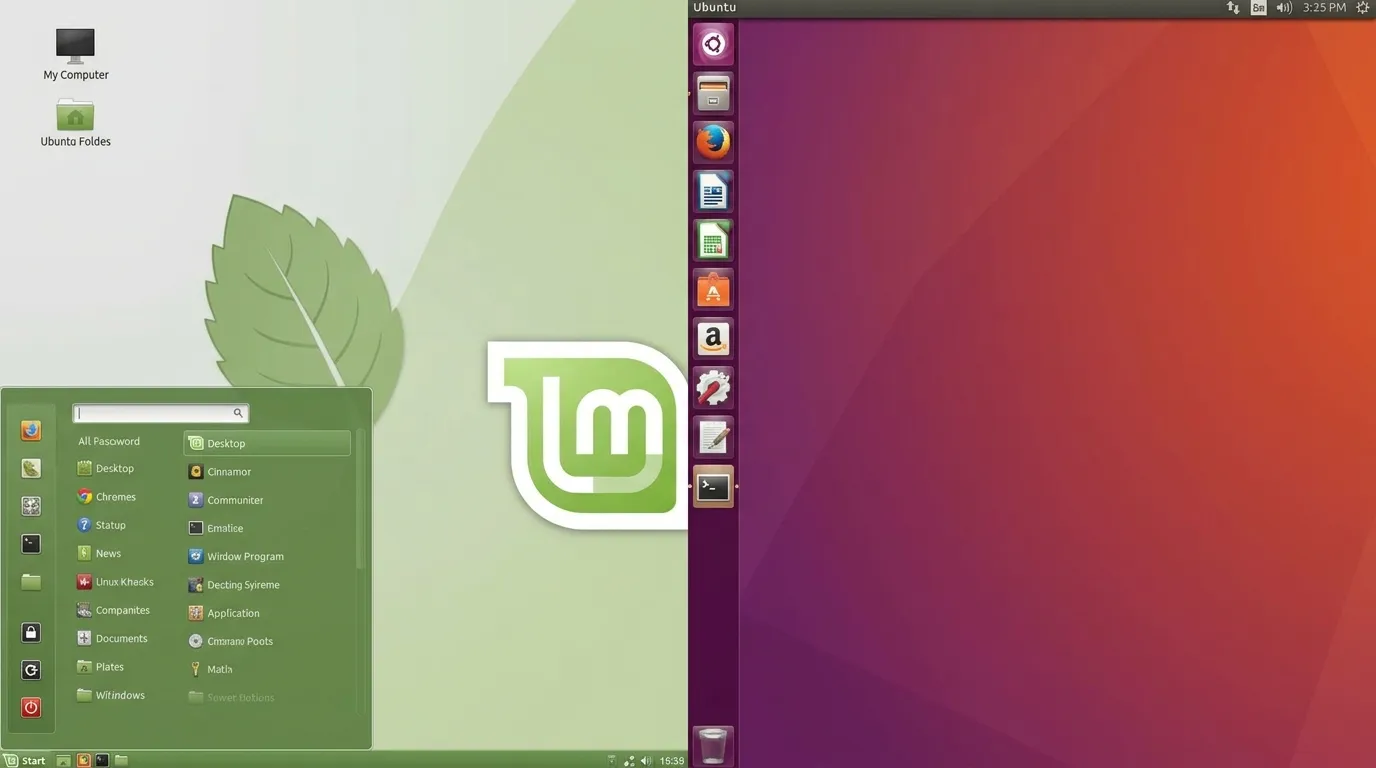
Mint Cinnamon is designed to feel familiar and traditional. Ubuntu GNOME is more modern and uses a different approach to application launching, window management, and workspaces.
Mint also makes some decisions differently from Ubuntu because the Mint project modifies the Ubuntu foundation it uses. One well-known example is software packaging. Mint has traditionally favored native Debian packages in situations where Ubuntu has increasingly used Snap packages.
This does not mean one distribution is universally better.
A person who likes the Windows-style desktop may prefer Mint. Someone who enjoys GNOME and Ubuntu’s wider ecosystem may prefer Ubuntu.
Desktop Environment
Linux Mint’s main Cinnamon edition provides a conventional desktop. The application menu sits in a familiar location, open windows are easy to see from the panel, and users can arrange the desktop in a way that feels familiar to Windows users.
Ubuntu’s GNOME desktop takes a different approach. Applications can be launched from the dock or application overview, and workspaces are an important part of the interface.
Neither design is inherently better. It comes down to preference.
If you want a traditional desktop with minimal adjustment, Mint is likely to feel easier. If you prefer GNOME’s workspace-based approach, Ubuntu may be a better fit.
Ease of Use
Both distributions are beginner-friendly.
Mint has an advantage for people coming directly from Windows because its Cinnamon interface uses familiar desktop conventions. Basic actions such as opening applications, browsing folders, managing windows, and accessing settings are easy to understand.
Ubuntu is also straightforward to install and use. Its installer walks users through the main setup process, and the GNOME interface is clean once you become familiar with it.
For a first Linux installation, either one can work well.
The difference is mainly the learning curve. Mint tends to require less adjustment for traditional desktop users.
Software and Package Management
Both Mint and Ubuntu have access to large software repositories and support the APT package system.
Mint also provides its own Software Manager, which lets users search for and install applications through a graphical interface.
Ubuntu includes its own graphical software tools and also supports Snap packages. Snap is Canonical’s package format and is designed to package applications with many of their dependencies.
Mint takes a different position on Snap and has historically chosen to manage certain applications through traditional packages instead.
For everyday users, this difference may barely matter. For advanced users, it can affect which installation method they prefer.
Hardware Requirements
Hardware requirements can influence the decision more than any desktop feature.
Linux Mint lists 2 GB of RAM as a minimum, with 4 GB recommended for comfortable use, along with 20 GB of disk space.
Ubuntu 26.04 Desktop lists a 2 GHz dual-core processor, 6 GB of system memory, and 25 GB of free storage as its recommended requirements.
These figures should not be treated as strict performance guarantees. Actual performance depends on the processor, graphics hardware, storage, background services, applications, and desktop environment.
Still, the published requirements point to a useful rule: Mint is often the more attractive starting point for older hardware, especially when paired with Xfce or MATE.
A newer computer with plenty of memory should have no trouble running either distribution.
Updates and Long-Term Support
Both projects provide long-term support options.
Linux Mint 22.3 is supported until 2029.
Ubuntu 26.04 LTS receives standard support through May 2031.
Ubuntu also has additional support options through Ubuntu Pro. This can matter to organizations that need longer security coverage.
For home users, both provide enough support time that frequent reinstallations should not be necessary.
The release strategy is different, however. Ubuntu has a clearly defined six-month release cycle, with LTS versions appearing every two years. Mint’s releases are closely tied to its underlying package base.
Security
Both Linux Mint and Ubuntu include standard Linux security features and receive security updates.
The larger security issue for most desktop users is not whether one distribution is magically secure. It is whether the system is kept updated, applications come from trusted sources, passwords are protected, and unnecessary services are not exposed.
Ubuntu has a large security infrastructure because it is used across desktops, servers, cloud systems, and enterprise environments.
Mint benefits from the security work that goes into its Ubuntu base while adding its own packages and tools.
For either system, regular updates are one of the simplest ways to keep a Linux installation secure.
Gaming
Both Mint and Ubuntu can be used for PC gaming.
Steam supports Linux, and tools such as Proton allow many Windows games to run on Linux. Hardware compatibility, graphics drivers, anti-cheat systems, and the individual game’s support can matter more than the distribution itself.
Ubuntu has a large amount of gaming documentation and hardware-related community support.
Mint can also be a good gaming desktop, particularly for users who prefer Cinnamon or want a simpler traditional interface.
For gaming, the graphics card and driver situation should be checked before choosing between the two. A distribution cannot solve every compatibility issue created by a particular game or hardware setup.
Privacy
Privacy is another area where users may notice differences in default behavior and application choices.
Mint generally takes a conservative desktop approach and gives users a traditional local-computer experience.
Ubuntu has some services and integrations that are more closely tied to Canonical’s ecosystem. That does not make Ubuntu inherently unsafe, but users who prefer a minimal setup may want to review installed services and application permissions after installation.
For privacy-conscious users, Mint may feel more straightforward. Ubuntu can also be configured carefully to suit users who want more control.
Linux Mint vs Ubuntu: Performance Comparison
Performance depends heavily on hardware and desktop environment, so there is no universal winner.
On a modern PC with a recent processor and enough RAM, both should provide a responsive desktop. Differences become more noticeable on older machines.
Mint’s Xfce edition is especially useful for systems that cannot comfortably handle a heavier desktop. MATE is another option for users who want a traditional interface with relatively modest resource demands.
Ubuntu Desktop’s GNOME environment can require more memory and graphics resources than a lightweight Mint setup.
That does not mean Ubuntu is slow. On current hardware, it can run very well.
The better question is whether the computer has enough resources for the desktop you want to use.
Mint vs Ubuntu for Beginners
For a complete Linux beginner, Linux Mint is often the easier recommendation.
The Cinnamon desktop resembles the Windows desktop enough that basic navigation feels familiar. The Start-menu-style application launcher, taskbar, system tray, and file manager reduce the number of new concepts a Windows user has to learn at once.
Ubuntu is still beginner-friendly, but GNOME works differently.
If you have used Windows for years and simply want a free operating system that feels familiar, start with Mint Cinnamon.
If you are willing to learn a different desktop workflow, Ubuntu is also a strong first Linux distribution.
Mint vs Ubuntu for Older PCs
Mint has the advantage here.
The Xfce and MATE editions give users lightweight desktop choices. Mint’s published requirements are also modest compared with the current Ubuntu Desktop requirements.
For an older laptop with 4 GB of RAM, an SSD, and a relatively old processor, Mint Xfce or MATE can be a sensible choice.
That said, hardware age matters. If the computer has a very old hard drive, replacing it with an SSD may produce a larger improvement than changing distributions.
Mint vs Ubuntu for Gaming
Ubuntu has a slight advantage for users who want the broadest amount of mainstream Linux gaming documentation and hardware guidance.
Mint remains a capable gaming system. Steam, Proton, graphics drivers, and common Linux gaming tools can be used on Mint as well.
For a dedicated gaming PC, the decision should be based on GPU compatibility, the games you play, controller support, driver availability, and whether the specific games rely on anti-cheat software that supports Linux.
If the same hardware works properly on both systems, desktop preference can become the deciding factor.
Mint vs Ubuntu for Work and School
Both can handle common office and school tasks.
Web browsing, email, document editing, spreadsheets, presentations, PDF files, video calls, and programming are all possible on either distribution.
Mint includes LibreOffice and other everyday tools, while Ubuntu provides a clean base that can be expanded with additional applications.
The bigger issue is compatibility with software required by your school or employer.
If your workplace depends on Microsoft-specific applications that have no Linux version, neither Mint nor Ubuntu will solve that problem by itself. Web versions, compatibility layers, virtual machines, or remote desktops may be needed.
Mint vs Ubuntu for Developers
Ubuntu has a strong advantage for developers who want a widely documented development environment.
It is commonly used for programming, cloud development, server administration, containers, and other technical work. Many development tutorials provide Ubuntu-specific instructions.
Mint can run most of the same development tools because it uses an Ubuntu package base in its main editions.
For a developer who wants a desktop-first system, Mint can be excellent. For someone who frequently works with Ubuntu servers or wants their desktop to closely match an Ubuntu-based production environment, Ubuntu may be the simpler choice.
Which Is More Secure?
Neither Mint nor Ubuntu should be treated as automatically secure simply because it is Linux.
Both require regular updates and sensible security practices.
Ubuntu benefits from Canonical’s large security operation and broad use across desktop, server, and cloud systems. Mint uses an Ubuntu package base and adds its own maintenance tools.
For a typical home user, keeping the system updated and installing software from trusted repositories are more important than choosing one of these distributions based solely on security.
Which One Uses Less RAM?
Linux Mint can use less RAM, particularly when you choose Xfce or MATE instead of Cinnamon.
Ubuntu’s GNOME desktop generally uses more resources than a lightweight Linux Mint configuration.
The exact memory usage will vary by version, services, applications, drivers, and hardware. A system with plenty of RAM should have enough room for either desktop.
If RAM is limited, Mint Xfce is one of the first configurations worth testing.
Which One Is Easier to Install?
Both are relatively easy to install.
Ubuntu provides a modern graphical installer with clear steps for selecting the disk, creating a user account, choosing a time zone, and configuring the installation.
Mint also provides a graphical installer designed for desktop users.
The process is similar enough that someone who can install one should have little trouble installing the other.
Before installing either operating system, back up important files. A clean Linux installation can erase existing partitions depending on the choices made during setup.
Which One Should You Choose?
Choose Linux Mint if you:
- Want a Windows-like desktop
- Have an older or modest PC
- Prefer Cinnamon, MATE, or Xfce
- Want a simple desktop setup
- Prefer traditional package management
- Are moving from Windows and want less adjustment
Choose Ubuntu if you:
- Prefer GNOME
- Want the standard Ubuntu experience
- Work with Ubuntu servers or cloud systems
- Need extensive developer documentation
- Have newer hardware
- Want Canonical’s broader support ecosystem
There is no universal winner in the Mint vs Ubuntu debate.
For many home users, Mint is the easier starting point. For developers, technical users, and people already working with Ubuntu environments, Ubuntu can be the better match.
Frequently Asked Questions About Mint and Ubuntu
Is Linux Mint based on Ubuntu?
The main Linux Mint editions use an Ubuntu package base. Linux Mint also produces Linux Mint Debian Edition, known as LMDE, which uses Debian instead of Ubuntu.
Is Mint faster than Ubuntu?
Mint can feel faster on modest hardware, especially when using Xfce or MATE. On a modern computer, the difference may be much smaller.
Can Linux Mint run Ubuntu software?
Many applications packaged for Ubuntu can also be used on Mint because the main Mint editions share an Ubuntu package base. However, users should check package compatibility rather than assuming every Ubuntu package will work perfectly.
Is Ubuntu better for programming?
Ubuntu is a strong choice for programming because it has extensive documentation, a large user base, and broad support for development tools. Mint can also run most common programming environments.
Is Linux Mint good for Windows users?
Yes. Linux Mint Cinnamon is particularly suitable for Windows users because its desktop layout is familiar.
Can I play Steam games on Linux Mint and Ubuntu?
Yes. Steam is available for Linux, and Proton supports many Windows games. Actual compatibility depends on the game, graphics hardware, drivers, and anti-cheat technology.
Which is better for an old laptop, Mint or Ubuntu?
Linux Mint is usually the better starting point, particularly with Xfce or MATE. Ubuntu also has lightweight official flavors if standard Ubuntu Desktop is too demanding for the hardware.
Which one should a beginner install?
For a Windows user who has never used Linux, Linux Mint Cinnamon is often the simplest choice. Ubuntu is also beginner-friendly and may be a better fit if you want to learn the GNOME desktop or work with Ubuntu-based servers.
Conclusion: Mint and Ubuntu
Linux Mint and Ubuntu are both strong choices for a Linux desktop, but they target somewhat different preferences.
Mint puts the familiar desktop experience first. Cinnamon provides a traditional layout, while MATE and Xfce give users lighter alternatives. Its current 22.3 release is based on Ubuntu’s Noble package base and is supported through 2029.
Ubuntu takes a broader approach. Its GNOME desktop has a different workflow, and its ecosystem extends well beyond personal computers into development, servers, cloud computing, and enterprise environments. Ubuntu 26.04 LTS provides standard support through May 2031.
For a Windows user with an older computer, Mint is often the better first choice. For a developer or technical user who already works with Ubuntu, Ubuntu may be the more natural choice.
The good news is that neither decision is permanent. Both systems can be tested from a bootable USB before installation. Trying the desktop on your own hardware is often the best way to decide which one feels right.
If you are choosing between Mint and Ubuntu today, start with your hardware, your software needs, and the desktop style you prefer. Those three factors will tell you more than a generic “which Linux is better” ranking.