

Cline vs Cursor: What’s the Difference and Which Is Better?

Choosing between Cline vs Cursor can be confusing, especially if you’re looking for an AI tool that can do more than autocomplete code.
Both tools can read your project, edit files, run commands, work with AI models, and help you build software. But they take different approaches.
Cline is an open-source AI coding agent that can run inside editors such as VS Code and Cursor, as well as through its CLI. It gives developers a high level of control over models, providers, tools, and permissions.
Cursor, on the other hand, is a dedicated AI code editor built around AI-assisted development. It includes its own Agent experience, Composer, model options, cloud agents, MCP support, and other developer features.
So, which one should you choose?
For developers who want maximum flexibility and control over AI providers, Cline is very attractive. For developers who want a complete AI-first editor with built-in features, Cursor is often the easier choice.
Let’s compare them feature by feature.
Cline vs Cursor: Quick Answer
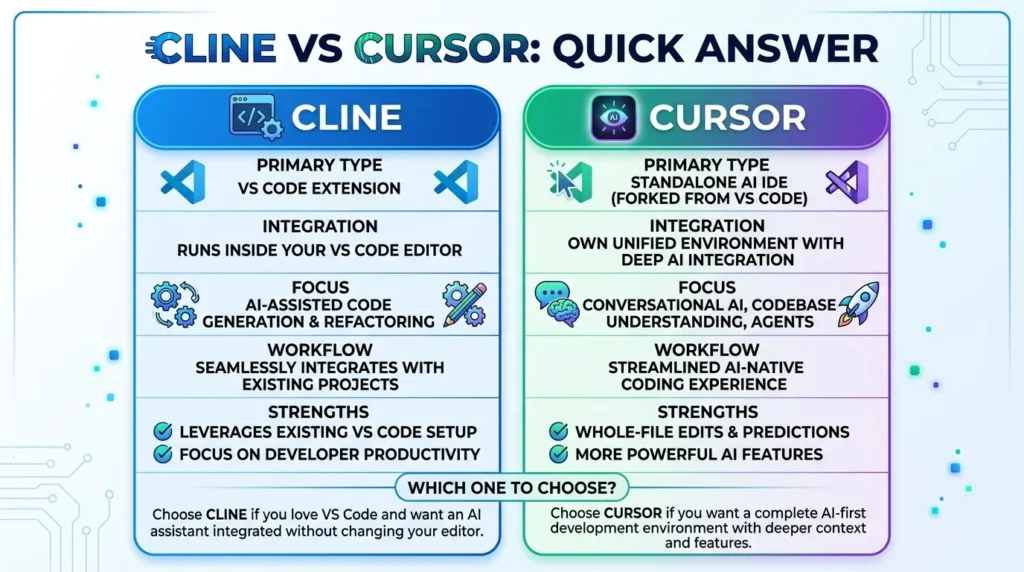
If you want the short version:
Choose Cline if you want:
- An open-source coding agent
- To keep using your existing editor
- Your own API keys
- Multiple AI providers
- Greater control over AI costs
- MCP support
- A flexible CLI workflow
- More control over permissions and tools
Choose Cursor if you want:
- A dedicated AI code editor
- Built-in AI coding features
- Agent workflows
- Composer
- Cloud agents
- Integrated model selection
- A polished editor experience
- Minimal setup
Cline is free for individual developers, with users paying for AI inference rather than a Cline subscription. It also supports bring-your-own API keys from providers such as Anthropic, OpenAI, Google, OpenRouter, and others.
Cursor has a free Hobby plan and paid plans beginning at $20 per month for Pro. Its current individual plans also include Pro+, priced at $60 per month, and Ultra, priced at $200 per month.
Our quick verdict
| If you care most about… | Better choice |
|---|---|
| Open-source software | Cline |
| Using your own API keys | Cline |
| Model/provider freedom | Cline |
| Built-in AI editor | Cursor |
| Easy setup | Cursor |
| Integrated Agent experience | Cursor |
| Cloud agents | Cursor |
| MCP | Both |
| CLI workflows | Cline |
| Polished editor experience | Cursor |
| Controlling AI costs | Cline |
| Beginner-friendly setup | Cursor |
What Is Cline?
Cline is an open-source AI coding agent.
It can work inside several development environments, including VS Code, Cursor, JetBrains IDEs, Windsurf, Zed, and Neovim through ACP, as well as through its own CLI.
Instead of being tied to one AI model provider, Cline lets users connect different providers.
The official Cline pricing page says users can bring their own API keys and use providers such as:
- Anthropic
- OpenAI
- OpenRouter
- AWS Bedrock
- Google Vertex
- Groq
- Cerebras
- DeepSeek
- Vercel AI Gateway
This gives developers a lot of freedom when choosing how their AI requests are handled.
Cline can also:
- Read project files
- Create files
- Edit code
- Run terminal commands
- Browse websites
- Use MCP tools
- Debug problems
- Work with multiple files
- Automate repetitive tasks
Its official tool documentation describes file operations, terminal operations, browser operations, MCP tools, and task management as part of its agent capabilities.
What Is Cursor?
Cursor is an AI-focused code editor built around the VS Code foundation.
Instead of adding an AI agent to your existing editor, Cursor provides an editor where AI is a central part of the development experience.
Its current feature set includes:
- Agent
- Composer
- Tab completions
- Multiple AI models
- MCP
- Skills
- Hooks
- Cloud agents
- Bugbot
- Plugins
Cursor’s current pricing page lists a free Hobby plan and paid individual plans including Pro, Pro+, and Ultra.
Cursor also supports models from several providers. Its documentation says the editor supports frontier models from companies including OpenAI, Anthropic, Google, and xAI, alongside Cursor’s own models.
That means you don’t have to rely on a single AI model.
Cline vs Cursor: Main Differences
The biggest difference is the philosophy behind each tool.
Cline
“Bring the agent into the environment you already use.”
Cline works as an extension or through other supported interfaces.
You can keep your existing VS Code setup and add Cline to it.
Cursor
“Use an editor designed around AI.”
Cursor gives you a dedicated environment built from the ground up for AI-first programming.
This distinction matters more than it might seem.
If you already have a carefully configured VS Code environment with extensions, themes, settings, and workflows, Cline lets you keep that environment.
If you want an editor where AI is deeply integrated from the beginning, Cursor may feel more natural.
Cline vs Cursor: Feature Comparison
| Feature | Cline | Cursor |
|---|---|---|
| AI coding agent | Yes | Yes |
| Open source | Yes | No |
| Dedicated editor | No | Yes |
| VS Code support | Yes | Cursor itself |
| JetBrains support | Yes | Limited compared with Cline’s editor range |
| CLI | Yes | Yes |
| Multiple AI providers | Yes | Yes |
| Bring your own API key | Yes | More limited depending on model and feature |
| MCP | Yes | Yes |
| Browser tools | Yes | Yes |
| File editing | Yes | Yes |
| Terminal commands | Yes | Yes |
| Cloud agents | No equivalent built into the open-source extension | Yes |
| Agent workflows | Yes | Yes |
| Free option | Yes | Yes |
| Paid subscription required for the tool | No for individual Cline | Optional |
| Usage-based AI cost | Yes | Yes |
| Best for control | Cline | — |
| Best for integrated editor experience | — | Cursor |
Cline’s official documentation confirms support for MCP, terminal commands, browser operations, file editing, and other agent tools.
Cursor’s current plans include Agent, MCP, cloud agents, and other AI development features depending on the plan.
Cline vs Cursor for Coding
Both tools can help you write software.
The difference becomes clearer when you give them a large task.
For example, imagine you say:
“Build a user authentication system for this application.”
An AI coding agent may need to:
- Inspect the existing project.
- Understand the framework.
- Find the relevant files.
- Create new files.
- Modify existing code.
- Install packages.
- Run tests.
- Find errors.
- Fix the errors.
- Review the final changes.
Both Cline and Cursor can handle this kind of multi-step work.
Both tools can execute terminal commands to run tests and fix failing specs as part of a larger development workflow.
Cursor also has an Agent workflow designed to work across a codebase and perform development tasks. Its current product pages highlight Agent, Composer, cloud agents, and other coding features.
Which is better for coding?
For raw flexibility, Cline has an advantage.
For a ready-to-use AI coding environment, Cursor has an advantage.
Cline vs Cursor for Large Projects
Large projects create different problems from small coding tasks.
An AI agent needs to understand:
- Project structure
- Dependencies
- Coding conventions
- Existing architecture
- Configuration
- Tests
- Documentation
- Related files
Both Cline and Cursor can work with large codebases.
Cline gives developers more direct control over the tools and model provider. It can also use subagents for read-only research across a codebase.
Cursor provides its own codebase-aware AI features and Agent workflows inside the editor.
For a developer who wants everything inside one polished application, Cursor may feel easier.
For someone who wants to control the model and environment more closely, Cline may be more appealing.
Cline vs Cursor for AI Agents
Agentic coding is where both tools become much more interesting.
Instead of simply answering:
“How do I write this function?”
an agent can take a larger goal and work through several steps.
For example:
“Find why the checkout page crashes, fix the problem, run the tests, and explain the changes.”
Cline supports this style of work directly.
Its documentation shows that Cline can read files, execute commands, browse websites, interact with MCP tools, and create or modify project files.
Cline also has Plan and Act modes, along with approval controls for tool actions.
Cursor also has Agent workflows and cloud agents.
Its current plans include cloud agents, and Cursor describes these agents as capable of working on coding tasks while you continue working elsewhere.
Agent winner
This depends on what you want.
Cline: More control over how the agent works.
Cursor: More integrated agent experience and cloud workflows.
Cline vs Cursor and MCP
MCP stands for Model Context Protocol.
It provides a standard way for AI applications to connect to external tools and data sources.
For example, an MCP server could allow an AI coding agent to:
- Query a database
- Access GitHub
- Read information from another service
- Work with project management software
- Use custom developer tools
Cline has strong MCP support.
Its documentation says MCP works with both the Cline VS Code extension and Cline CLI. Cline can discover and use MCP tools and can also help users create or configure MCP servers.
Cursor also supports MCP.
Its current pricing page lists MCPs, skills, and hooks among the features available on paid plans.
MCP winner
Cline gets the edge if you want deep control and customization.
Cursor is a strong choice if you want MCP integrated into a broader AI editor.
Cline vs Cursor for Model Choice
Model selection is one of Cline’s biggest strengths.
Cline is designed to work with many AI providers.
The official Cline site says users can bring their own API keys and switch between providers without being locked into one company’s model ecosystem.
This can be useful if you already have API access to a model you prefer.
You can use one model for complex coding, another for simple tasks, and a cheaper model for high-volume work, depending on your provider and budget.
- One model for complex coding
- Another for simple tasks
- A cheaper model for high-volume work
- You can also route Cline’s BYOK endpoint to local inference servers managed via LM Studio and Ollama for 100% offline, privacy-first coding.
Cline gives you considerable freedom here.
Cursor also offers multiple model choices.
Its documentation says Cursor supports models from OpenAI, Anthropic, Google, xAI, and other providers, along with Cursor’s own models.
Model-choice winner
Cline is the stronger choice if your priority is provider freedom and BYOK.
Cursor is better if you want model selection without spending time managing separate provider configurations.
Cline vs Cursor Pricing
Pricing is one of the biggest differences between the two.
Cline pricing
Cline’s open-source version is free for individual developers.
You pay for the AI inference itself rather than paying Cline a monthly subscription.
Cline also supports BYOK, meaning you can connect your own API keys and pay the AI provider directly.
This makes Cline appealing to developers who want direct control over spending.
Cursor pricing
Cursor has several subscription levels.
As of August 2026, its individual plans include:
| Plan | Price |
|---|---|
| Hobby | Free |
| Start — India only | ₹649/month |
| Pro | $20/month |
| Pro+ | $60/month |
| Ultra | $200/month |
Cursor’s official pricing documentation lists these current plans.
Cursor also has Teams and Enterprise options.
The Teams plans currently include Standard at $40 per user per month and Premium at $120 per user per month.
Cursor’s pricing is more complicated than a simple subscription because included usage depends on the models you select.
Cursor says its plans contain separate usage pools for Cursor models and third-party models, and additional usage can be billed after included usage is consumed.
Cline vs Cursor for Budget-Conscious Developers
This is one of the easiest categories to decide.
Cline
You don’t pay a Cline subscription for the open-source version.
You pay for the AI model usage.
If you use a low-cost model or have inexpensive API access, your monthly cost can remain low.
Cursor
Cursor has a free plan, but regular Agent use may push you toward a paid subscription.
Its Pro plan currently costs $20 per month, while heavier users can choose Pro+ or Ultra.
Winner for cost control
Cline.
It gives you more direct control over where the AI money goes.
Cline vs Cursor for Beginners
Beginners often care less about model providers and more about getting work done.
This is where Cursor has a strong advantage.
You download Cursor, open a project, and start using its AI features.
The workflow is straightforward.
Cline requires a little more understanding.
You may need to decide:
- Which AI provider to use
- Which model to select
- Whether to use your own API key
- Which permissions to grant
- Which MCP servers to install
- How much you want the agent to automate
That extra control is useful for experienced developers.
For beginners, however, it can feel like more setup.
Beginner winner
Cursor.
Cline vs Cursor for Experienced Developers
Experienced developers may appreciate Cline’s flexibility.
If you already know which models you like, understand API pricing, and have a custom VS Code workflow, Cline can fit into that environment without forcing you to change editors.
Advanced developers who customize their environments can integrate Cline into existing workflows across different operating systems and editors.
Cursor is still attractive for experienced developers who want a tightly integrated AI editor.
The question is whether you value control or integration more.
Cline vs Cursor: Ease of Use
Cursor wins on simplicity.
Cline wins on flexibility.
That’s the simplest way to explain it.
Cursor provides a single environment where the editor and AI features are designed to work together.
Cline lets you build a setup around your own preferences.
You can choose the editor, provider, model, MCP servers, and other tools.
For someone who enjoys configuring their development environment, that can be a major advantage.
For someone who wants to start coding quickly, Cursor is easier.
Cline vs Cursor: Security and Permissions
AI coding agents can modify files and run commands, so permissions matter.
Cline provides approval controls for actions.
Its documentation explains that commands can be marked as requiring approval, and users can control which actions the agent can perform.
Cline also has a YOLO mode that automatically approves actions.
However, Cline itself warns that YOLO mode can allow potentially destructive commands and should be used carefully.
This is an important reminder:
Never give an AI coding agent more access than your project requires.
Use Git, backups, isolated environments, and approval controls when appropriate.
Cursor also provides privacy and administrative controls for its paid plans.
Cursor says that Privacy Mode can be enabled so code data is not used for training by Cursor or its model providers.
For business users, Cursor also offers SSO, centralized administration, usage analytics, and other controls through its Teams and Enterprise offerings.
Cline vs Cursor for CLI Work
Cline has a strong advantage here.
Cline provides an official CLI that runs multi-step agent tasks directly in the terminal, supporting headless workflows and automati
The CLI supports commands for:
- Starting tasks
- Authentication
- MCP
- Configuration
- History
- Hooks
- Plugins
- Scheduling
- Diagnostics
- Updates
The current CLI documentation also supports headless workflows, which can be useful for CI/CD and automation.
Cursor also provides CLI-related workflows, but Cline’s CLI is central to its broader open-source agent ecosystem.
CLI winner
Cline.
Cline vs Cursor for VS Code Users
If you already use VS Code, this becomes an interesting decision.
Cline can be installed directly as a VS Code extension.
The official installation guide says to open VS Code’s Extensions panel, search for Cline, and install it.
That means you don’t have to abandon your existing editor.
Your current:
- Extensions
- Themes
- Settings
- Keybindings
- Workspace configuration
can remain part of your workflow.
Cursor is based on the VS Code codebase but is its own application.
It offers a more integrated AI experience, but switching to Cursor means adopting a different editor environment.
If you love VS Code:
Try Cline first.
If you want an AI-first editor:
Try Cursor.
Cline vs Cursor for Teams
Teams have different requirements from individual developers.
They may need:
- Central billing
- Usage controls
- SSO
- User management
- Security policies
- Shared configuration
- Audit information
Cursor currently offers Teams and Enterprise plans with features such as centralized billing, administration, usage analytics, team-wide privacy controls, SAML/OIDC SSO, and shared context for cloud agents and automations.
Cline also offers an Enterprise option with features such as SSO, centralized billing, role-based access control, authentication logs, and team management.
For organizations, the choice should be based on security requirements, existing developer workflows, model preferences, and expected usage.
Cline vs Cursor: Pros and Cons
Cline Pros
- Open source
- Free for individual developers
- BYOK support
- Many AI providers
- Strong MCP support
- VS Code extension
- CLI
- Multiple editor options
- Detailed permission controls
- Highly customizable
Cline Cons
- More setup
- Model and provider choices can be confusing
- API costs require attention
- More configuration for beginners
- You may need to manage your own provider accounts
Cursor Pros
- AI-first editor
- Easy to start
- Strong Agent experience
- Composer
- Multiple model options
- MCP support
- Cloud agents
- Bugbot
- Plugins, skills, and hooks
- Team administration
- Free Hobby plan
Cursor Cons
- Paid plans can become expensive for heavy users
- Usage limits vary by plan and model
- Less control than a BYOK-first workflow
- Requires switching from your current editor
- Advanced usage can involve additional usage charges
Cline vs Cursor: Which Is Better for AI Coding?
If we judge the tools only by general AI coding ability, the answer is close.
Both can:
- Understand code
- Edit files
- Run commands
- Work through multi-step tasks
- Use external tools
- Work with MCP
- Help debug software
The bigger difference is how you want to work with the AI.
Cline feels more like a configurable agent that you place inside your development environment.
Cursor feels more like an AI development environment where the editor itself is built around the agent.
That’s why developers can have very different opinions about which one is better.
Cline vs Cursor: Which Is Better for Large Codebases?
For large codebases, both can be useful.
Cline
Cline gives you control over:
- Model
- Provider
- Tools
- Permissions
- MCP
- Editor
- CLI
- Agent configuration
It also supports subagents for read-only exploration of large projects.
Cursor
Cursor gives you:
- Codebase-aware AI
- Agent workflows
- Composer
- Multiple models
- Cloud agents
- Integrated editor features
For developers who want a single application to handle the whole workflow, Cursor is often easier.
For developers who want to customize every part of the process, Cline is more appealing.
Cline vs Cursor: Which One Uses Less Money?
There isn’t a universal answer because your usage determines the final cost.
Cline itself does not charge individual developers a subscription for the open-source version.
You pay for the model inference you use.
Cursor charges subscription fees for its paid plans, with included model usage and additional usage options.
If you already have inexpensive API access and don’t mind managing it yourself, Cline can be cheaper.
If you prefer a predictable monthly subscription and don’t want to manage separate API accounts, Cursor may be easier.
Cline vs Cursor 2026: Which Should You Choose?
Here’s the simplest decision tree.
Choose Cline if:
You want control.
Cline is a strong choice if you want to select your own models, bring your own API keys, keep your current editor, configure MCP, and manage AI usage directly.
Choose Cursor if:
You want convenience.
Cursor is a strong choice if you want a dedicated AI editor with Agent, Composer, model options, cloud agents, MCP, and other features already integrated.
Choose both if:
You don’t have to pick one forever.
Cline can run inside Cursor itself, according to Cline’s installation documentation.
That means you can experiment with Cline while using Cursor as your editor.
This can be useful if you want Cursor’s editor experience but also want to test Cline’s model-provider flexibility.
For an independent, benchmark-based comparison of execution speed, code quality, pricing at real usage levels, and context handling on mid-sized to large codebases, see this Cline vs Cursor comparison
Cline vs Cursor: Final Comparison
| Category | Winner | Why |
|---|---|---|
| Ease of use | Cursor | More integrated setup |
| Open source | Cline | Open-source project |
| BYOK | Cline | Strong provider flexibility |
| AI provider choice | Cline | Broad provider support |
| Editor experience | Cursor | AI-first editor |
| VS Code integration | Cline | Works directly as an extension |
| Agent experience | Cursor | Deep editor integration |
| CLI | Cline | Strong terminal workflow |
| MCP | Tie | Both support MCP |
| Cloud agents | Cursor | Built-in cloud agent offering |
| Cost control | Cline | Pay for model inference directly |
| Beginner experience | Cursor | Less setup |
| Customization | Cline | Greater control |
| Team features | Cursor | Strong integrated team tooling |
| Advanced control | Cline | More control over providers and tools |
| Overall for most developers | Cursor | Easier complete AI coding environment |
| Overall for power users | Cline | More flexibility and control |
Frequently Asked Questions
Is Cline better than Cursor?
Cline is better for developers who want open-source software, model-provider freedom, BYOK, and extensive control. Cursor is better for users who want a dedicated AI editor with integrated Agent features.
Is Cursor better than Cline?
Cursor is better if you want an easy-to-use AI coding environment where the editor and AI tools are designed to work together.
Is Cline free?
Yes. Cline’s open-source version is free for individual developers. You pay for AI inference based on the provider and model you use.
Is Cursor free?
Cursor has a free Hobby plan with limited usage. Paid individual plans currently start at $20 per month for Pro.
Can I use Cline inside Cursor?
Yes. Cline’s official installation documentation lists Cursor as a supported editor for installing the Cline extension.
Does Cline support MCP?
Yes. Cline supports MCP servers in both its VS Code extension and CLI.
Does Cursor support MCP?
Yes. Cursor’s current plans include MCP support, along with skills and hooks.
Which is better for coding, Cline or Cursor?
Both are capable. Cursor is often easier for developers who want an integrated AI editor, while Cline is more attractive to developers who want greater control over models, providers, tools, and permissions.
Which is better for beginners?
Cursor is generally easier for beginners because it provides an integrated editor and AI workflow.
Which is better for advanced developers?
Cline may be the better fit for advanced developers who want control over AI providers, API keys, MCP servers, permissions, and their existing editor setup.
Can Cline use different AI models?
Yes. Cline supports multiple providers and lets users bring their own API keys.
Can Cursor use different AI models?
Yes. Cursor supports models from multiple providers, including OpenAI, Anthropic, Google, and xAI, as well as Cursor’s own models.
Final Verdict: Cline vs Cursor
So, Cline vs Cursor: which one is better?
The answer depends on what you want from your AI coding workflow.
Cline is the better choice for control.
It is open source, works across several development environments, supports many AI providers, allows BYOK, offers MCP support, and provides a strong CLI.
Cursor is the better choice for convenience.
It provides a dedicated AI editor with Agent, Composer, cloud agents, MCP, skills, hooks, and other features built into one application.
For a developer who wants to install an AI tool and start working with minimal configuration, Cursor is the easier recommendation.
For a developer who already has a preferred editor, knows which AI models they want, and wants to control their API spending, Cline is the more flexible choice.
And there’s an interesting third option: use Cline inside Cursor.
That lets you combine Cursor’s editor with Cline’s agent and provider flexibility.
The simple answer:
Cursor = easier, more integrated AI coding experience
Cline = more control, flexibility, and provider freedom
If you’re a beginner, start with Cursor.
If you’re an experienced developer who likes controlling your tools, try Cline.
If you’re still unsure, test both on the same real project. Give each tool the same coding task and compare the results, speed, cost, and amount of manual work required.
That practical test will tell you much more than a feature list.
For another detailed breakdown of agent architecture, pricing models, MCP extensibility, background cloud agents, and when to use each tool (or both together), see this Cline vs Cursor overview.