How to Buy TikTok Coins and How Much They Cost

If you buy TikTok Coins regularly, the price you see can depend on where and how you purchase them. TikTok sells Coins through its app and, in supported countries, through its website, while taxes, currency conversion, payment fees, and regional pricing can affect the final amount you pay.
In this guide, I’ll show you how to compare TikTok Coin prices in 2026 and find cheaper purchase options without relying on suspicious third-party sellers. I’ll cover website versus app pricing, country differences, VPN use, payment methods, recharge options, and legitimate ways to save money on Coins.
The goal is simple: understand why TikTok Coins cost different amounts and choose the lowest legitimate price available to you.
How TikTok Coins Work and What You Can Use Them For
TikTok Coins are digital items that you buy and use inside TikTok to access certain virtual items as well as TikTok services. They are not regular currency and cannot be exchanged for cash or used to buy products from third parties.
What are TikTok Coins?
TikTok Coins work as an in-platform payment unit for selected TikTok features. You purchase Coins with real money, keep them in your TikTok account, and spend them on eligible features when they are available in your region.
TikTok requires users to be registered and generally at least 18 years old, or the age of majority in their jurisdiction if it is higher.
The basic process is:
Real money → TikTok Coins → eligible TikTok feature or Virtual Item
The number of Coins required for a feature is shown before you use them. TikTok also provides a Coin balance, Transaction History showing money spent on Coins, and Coin History showing Coins purchased and used.
What can you use TikTok Coins for?
TikTok Coins can be used for several TikTok features, although availability depends on the account, region, and features TikTok makes available. Current TikTok policy lists examples such as:
- Gifts: Use Coins to activate Gifts on eligible TikTok content.
- Heart Me: Use Coins for eligible Heart Me interactions.
- TikTok Promote: Use your Coin balance to pay for eligible Promote campaigns.
- Star Comments: Use Coins for eligible Star Comment features.
When you send a Gift, you are not transferring Coins or cash directly to another user. The Gift is a TikTok Virtual Item that is activated with Coins and used on the platform.
This matters when comparing cheap TikTok Coins. A lower price only helps if you are buying through a legitimate TikTok-supported method and can actually use the Coins for the feature you want. TikTok states that Virtual Items cannot be bought from, sold to, or exchanged with other users.
How Much Do TikTok Coins Cost in 2026
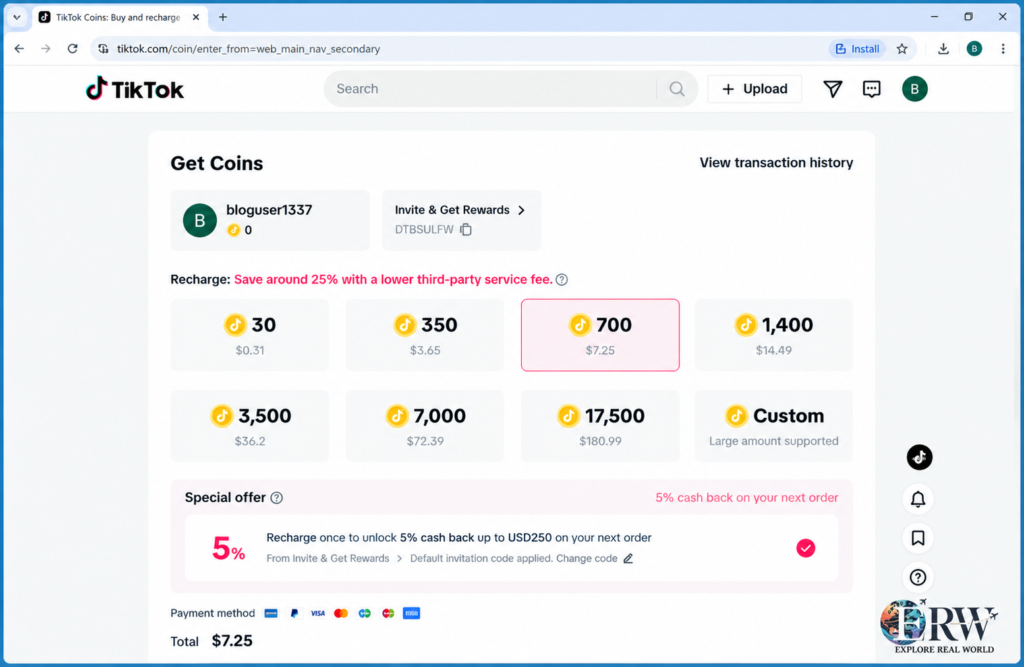
TikTok Coins do not have a fixed worldwide price. The cost depends on the number of Coins you buy, your country or currency, and the purchase channel you use. TikTok states that the cost per Coin can differ based on the quantity purchased and where the Coins are bought.
TikTok Coin Pricing
TikTok presents the available Coin packages and their prices before you complete a purchase. Instead of assuming that one package has the same price everywhere, I would check the actual price shown on your TikTok account at checkout.
For example, the same number of Coins can have a different final cost when purchased in different countries or through different channels. Currency conversion, taxes, and payment-provider charges can also affect what you ultimately pay.
Why TikTok Coin Prices Vary
Several factors can change the amount you pay:
| Factor | How it can affect the price |
|---|---|
| Coin package | Larger or smaller packages can have different per-Coin costs |
| Country | TikTok pricing can vary between markets |
| Currency | Local currency conversion can change the final amount |
| Purchase channel | App and web purchases can have different pricing |
| Taxes | Applicable taxes may be added to the purchase |
| Payment provider | Foreign-exchange or other payment fees may apply |
TikTok also states that the total price for a WebApp purchase is displayed when you buy the Coins, while additional payment-provider fees can apply in some cases.
Is There One Cheapest TikTok Coin Price?
There is no single price that is cheapest for every user in every country. The practical way to find a lower price is to compare the final checkout cost for the same Coin amount through TikTok’s supported purchase options.
For example, if you need 1,000 Coins, compare the price shown through the TikTok app with the price shown through TikTok’s website if web purchasing is available in your country. Do not compare only the advertised package price. Check the amount you will actually be charged after applicable taxes or payment fees.
This also explains why lists claiming that one country always has the cheapest TikTok Coins can become outdated. TikTok can change pricing, availability, currencies, and purchase conditions by market.
How to Buy TikTok Coins at the Cheapest Price
The cheapest legitimate option is usually found by comparing TikTok’s supported purchase channels before paying. TikTok allows Coin purchases through its app and, in supported countries, directly through TikTok’s website.
Buying TikTok Coins in the App
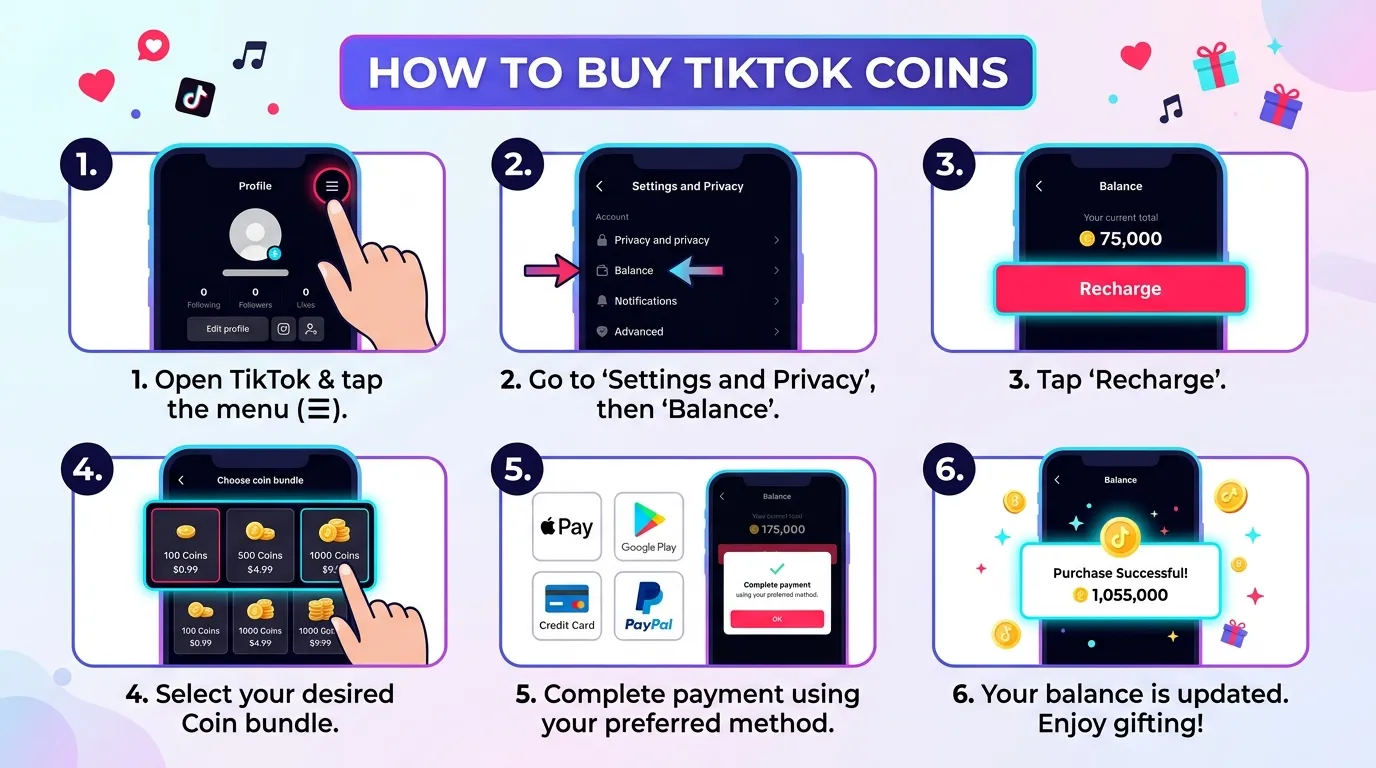
To buy Coins through the TikTok app:
- Open TikTok and sign in to your account.
- Open your profile and access the Coin balance or recharge option.
- Select the Coin package you want.
- Choose the available payment method.
- Review the total price.
- Confirm the purchase.
App purchases are processed through the relevant app store, such as the Apple App Store or Google Play Store.
Buying TikTok Coins Through the Website
In countries where TikTok WebApp purchases are supported, you can buy Coins directly through TikTok’s website.
The process is generally:
- Sign in to TikTok through a browser.
- Open the Coin recharge or purchase page.
- Select a Coin package.
- Review the displayed total.
- Complete payment using an available payment method.
TikTok states that the WebApp displays the total purchase price before you complete the transaction.
Why Compare the App and Website?
The app and website can have different pricing because purchases made through mobile platforms involve different payment channels. TikTok itself states that the cost of Coins can differ according to where they are purchased.
So, if you are trying to buy TikTok Coins cheaply, check both options when the website purchase option is available in your country. Compare the price for the same number of Coins, not just the package labels.
For example, if you want 1,000 Coins, check the cost of that amount on TikTok’s website and then compare it with the corresponding app purchase. Include any displayed taxes and consider possible payment-provider fees before deciding.
Should You Use a Third-Party Coin Seller?
I would avoid unofficial websites claiming to sell TikTok Coins at extremely low prices. TikTok’s Virtual Items Policy says Coins and other Virtual Items are for use on TikTok and cannot be purchased from, sold to, or exchanged with other users.
A low advertised price is not useful if the seller is unauthorized or asks for your TikTok login details. The safer approach is to compare prices within TikTok’s supported purchasing channels and use the payment method available through those channels.
How to Recharge TikTok Coins Cheaply
You can recharge TikTok Coins when your existing balance is low by purchasing another Coin package through a TikTok-supported purchase channel. TikTok allows Coin purchases in the app and, in supported countries, through its website.
Recharge on Mobile
To recharge Coins in the TikTok app, open your Coin balance and select the Recharge option. Choose the package you want, select an available payment method, review the displayed price, and confirm the purchase.
Mobile purchases are processed through the relevant app store, such as Apple App Store or Google Play Store. The exact options can depend on your country, device, and account.
Before paying, check the total amount rather than assuming that the displayed Coin package represents the final cost. Applicable taxes or other charges can affect the amount you pay.
Recharge on a Computer
If TikTok WebApp Coin purchases are available in your country, you can recharge through TikTok in a desktop or mobile browser.
Sign in to TikTok, open the Coin purchase or recharge page, select the required package, and review the total before completing payment. TikTok states that the WebApp displays the total purchase price at the time of purchase.
Checking the website can be useful when you are comparing prices because the purchase channel can affect the cost per Coin.
Payment Methods Without a Credit Card
You do not necessarily need a traditional credit card to purchase TikTok Coins. The payment options shown to you depend on your location and purchase channel.
Depending on the market, available options can include:
- Debit cards
- PayPal
- Other locally supported payment methods
- Payment methods offered through Apple App Store or Google Play
- TikTok-supported gift-card redemption in some countries
TikTok notes that gift-card redemption is available only in certain countries.
If you use a payment service that converts currencies, check its exchange rate and any foreign-transaction fee. A payment method that appears cheaper at first can cost more after those charges are added.
Ways to Reduce the Total Purchase Cost
The simplest way to reduce your TikTok Coin cost is to compare the final price before completing the purchase.
I would use these checks:
- Compare the app and website. If TikTok WebApp purchases are available to you, compare the same Coin amount through both channels.
- Compare the cost per Coin. A larger package is not automatically cheaper, so divide the total price by the number of Coins.
- Check taxes before paying. The final amount can include applicable taxes.
- Check payment fees. Your payment provider may charge currency-conversion or foreign-transaction fees.
- Use supported payment methods. Avoid unofficial sellers offering Coins outside TikTok’s approved purchasing channels.
- Buy only what you plan to use. Coins are digital items intended for use on TikTok and are not ordinary cash that you can withdraw later.
If you are comparing prices across countries, be careful with VPN-based purchases. A different displayed price does not necessarily mean you can complete the transaction under that region’s conditions, and TikTok’s policies and availability can vary by market.
Can a VPN Get You Cheaper TikTok Coins?
A VPN can change the IP address that websites see, but using a VPN does not guarantee a cheaper TikTok Coin purchase. TikTok says Coin prices can differ according to how many Coins you buy and where you buy them, but its 2026 Virtual Items Policy does not promise that changing your IP address will give you access to another country’s Coin pricing.
How Country-Based Pricing Works
TikTok uses different purchase conditions across markets. The price of Coins can vary by country, purchase quantity, currency, taxes, and purchase channel. TikTok also supports website purchases in some countries, while other purchases are handled through app stores such as Apple App Store or Google Play.
This means a Coin package that costs one amount in one market may have a different price in another market.
The important point is that country pricing is more than an IP address. The final transaction can involve the currency shown at checkout, applicable taxes, the payment provider, and the purchase channel.
Using a VPN to Change Your Apparent Location
A VPN routes your internet connection through a server in another location, which can make your IP address appear to come from that location.
For example, someone in Country A could connect to a VPN server in Country B and see websites differently. That does not mean TikTok will treat the account, payment method, and transaction as belonging to Country B.
I would therefore not treat a VPN as a guaranteed method for buying cheaper TikTok Coins. If TikTok shows a different price after a location change, you still need to check whether the purchase can actually be completed under the applicable account, payment, currency, and regional conditions.
What to Consider Before Changing Regions
Before trying to purchase Coins through another country, check these points:
- TikTok availability: Website Coin purchases are available only in supported countries.
- Account requirements: TikTok requires a registered account and generally requires users to be at least 18 or the applicable age of majority.
- Currency: The transaction is charged in the currency specified at purchase.
- Taxes and fees: TikTok says the displayed price can include applicable taxes or charges, while a payment provider may add fees such as currency-exchange or foreign-transaction fees.
- Payment compatibility: A lower regional price does not help if your payment method cannot complete the transaction.
- Regional availability: TikTok’s Virtual Items and purchasing methods can vary by country.
- Policy compliance: A VPN does not override TikTok’s Terms of Service, Virtual Items Policy, or applicable payment rules.
For a straightforward purchase, I would first compare the TikTok app and TikTok website available for your actual market. That gives you a price comparison without relying on an artificial location.
What Happens If TikTok Detects a VPN?
TikTok’s current Virtual Items Policy does not specify a standard penalty simply for using a VPN to access Coin pricing. So it would be inaccurate to claim that TikTok always blocks an account when it detects a VPN.
A location mismatch can still create a purchase problem. For example, the displayed region, account information, currency, payment method, and transaction details may not line up. A payment can fail, or a particular Coin purchase option may not be available.
TikTok also states that if a payment fails, is returned, or remains unpaid, it may suspend the TikTok account or access to Virtual Items.
For that reason, I would not base a Coin-saving strategy on simply connecting to a VPN server in a country with a lower advertised price. Compare TikTok’s legitimate purchase options first and judge the final checkout amount rather than relying on the VPN location alone.
Which Countries Have the Cheapest TikTok Coins?
There is no single country that can be confirmed as the cheapest place to buy TikTok Coins for every user in 2026. TikTok states that the cost per Coin can vary based on the quantity purchased and where the Coins are purchased.
2026 Country Price Comparison
TikTok does not publish a permanent worldwide table showing the cheapest Coin prices by country. Prices can also change, so an old country list may not match the amount shown at checkout today.
A useful comparison should therefore look at the same Coin package in each market rather than comparing unrelated packages.
| Comparison | What to check |
|---|---|
| Coin quantity | Compare the same number of Coins |
| Local price | Record the displayed price in each currency |
| Cost per Coin | Divide the package price by the Coin amount |
| Taxes | Check whether tax is included or added |
| Payment fees | Check currency-conversion or foreign-transaction charges |
| Purchase channel | Compare supported app and website prices |
This approach gives you a more realistic comparison than a list that simply labels one country as the cheapest.
Why Coin Prices Differ Between Countries
TikTok operates its Virtual Items system across different markets, and the available purchasing methods can vary by country. TikTok says the cost of Coins can differ according to where they are purchased.
Several factors can affect the final price:
- Local pricing for the market
- Currency exchange rates
- Applicable taxes
- The number of Coins in the package
- Whether the purchase is made through TikTok’s website or an app-store payment system
- Payment-provider fees
TikTok also notes that additional payment-provider fees can occur, including foreign-exchange or foreign-transaction fees.
So a country may appear cheaper based on its listed local price but become less attractive after currency conversion, taxes, or payment charges.
Local Currencies, Taxes, and Payment Fees
Currency is one of the easiest factors to overlook when comparing TikTok Coins internationally.
Suppose one market displays a lower local-currency amount than another. That does not automatically mean you will pay less from your own country. Your bank or payment provider may convert the transaction into your billing currency and apply its own exchange rate or fee.
Taxes can also change the final amount. TikTok’s policy states that applicable taxes and charges may be included in the purchase price, while payment providers can impose additional fees.
For this reason, compare the final amount you would actually be charged, not just the number displayed before checkout.
How to Compare TikTok Coin Prices Safely
The safest comparison starts with TikTok itself.
- Choose a specific Coin amount, such as 1,000 Coins.
- Check the price through TikTok’s supported purchase option in your market.
- If website purchases are available, compare the same Coin amount there.
- Convert prices into the same currency when comparing markets.
- Add applicable taxes and payment-provider fees.
- Calculate the effective cost per Coin.
- Use only TikTok-supported purchasing and payment methods.
I would also avoid relying on third-party websites that promise Coins at unusually low prices. TikTok’s Virtual Items Policy states that Virtual Items cannot be bought from, sold to, or exchanged with other users.
A country ranking can be useful as a starting point, but the checkout price is the number that matters. Regional prices can change, and a lower advertised price does not necessarily produce a lower final transaction cost.
Best Payment Methods for Buying TikTok Coins
The best payment method for TikTok Coins depends on your country, device, and whether you buy through the TikTok app or website. TikTok does not offer one universal payment method in every market. Coins can be purchased through the app using an app store payment system or, where available, through the TikTok website using a third-party payment provider.
Credit and Debit Cards
Credit and debit cards are among the most practical options when they are available for your TikTok Coin purchase.
For website purchases, TikTok uses a third-party payment provider, and the total amount payable is shown during checkout. Your card issuer can still apply additional charges, such as foreign-exchange or foreign-transaction fees, when the transaction involves another currency.
If you are comparing prices, check the final card charge rather than only the TikTok price displayed before payment.
PayPal
PayPal may be available as a payment option in some TikTok payment environments and regions, but it should not be treated as a worldwide Coin payment option.
The payment methods shown at checkout depend on the purchase channel and location. If PayPal appears as an available option for your transaction, review the final amount before confirming the payment.
Apple Pay and Google Pay
When you buy Coins through the TikTok app, the transaction can be handled by the relevant app store. TikTok specifically lists the Apple App Store and Google Play Store among the app stores that can process Coin purchases.
That means your available payment choices can depend on your Apple or Google account, device, country, and the payment methods supported by the relevant store.
Do not assume that Apple Pay or Google Pay will appear for every TikTok Coin purchase. Check the payment screen on your own account.
Regional Payment Options
TikTok can provide different purchasing options in different countries. The Virtual Items Policy states that Coins may also be available through gift cards in certain countries, with those cards redeemable through the WebApp.
Local payment options can therefore be useful when a credit card or PayPal is not available. The exact options depend on the market and the purchase method TikTok makes available to you.
Virtual Cards and Payment Security
A virtual card can be useful when your card provider supports it and the virtual card is accepted by the payment channel you are using. It can give you a separate card number for online transactions and can help you keep online purchases separate from your main physical card.
However, a virtual card does not make an unofficial TikTok Coin seller legitimate. I would use it only with a TikTok-supported purchasing channel.
For website purchases, TikTok says a third-party payment provider processes the payment and displays the total price at checkout. TikTok also warns that additional payment-provider fees, including currency-exchange or foreign-transaction fees, may apply.
For better payment security:
- Buy Coins through TikTok or a TikTok-supported app store.
- Check the website address before entering payment details.
- Review the final amount before confirming.
- Check whether your bank or payment provider charges currency-conversion fees.
- Do not give your TikTok password or payment details to a seller claiming to provide discounted Coins.
- Keep the purchase receipt in case you need to investigate a failed payment or refund.
TikTok states that Coins can only be purchased from TikTok, and Virtual Items cannot be purchased from, sold to, or exchanged with other TikTok users.
Are Free VPNs and Third-Party TikTok Coin Sellers Safe?
Free VPNs and third-party websites that advertise very cheap TikTok Coins are not the same as buying Coins directly through TikTok. The safest option is to purchase Coins through TikTok’s supported app or website channels and avoid sellers that ask for your TikTok login details or promise unusually large Coin discounts. TikTok states that Coins can be purchased through the app and, in supported countries, through its WebApp.
Risks of Free VPNs
A free VPN can change the IP address that websites see, but that does not guarantee a cheaper TikTok Coin purchase.
There are also practical reasons to be cautious with free VPN services. Some may have limited server locations, slower connections, aggressive advertising, or unclear data practices. A VPN should not be treated as a payment-security tool by itself.
For TikTok Coin purchases, there is another issue. A VPN location does not necessarily match your account, currency, payment method, or actual country. TikTok can make Virtual Items and purchasing methods available differently across markets.
So, if a free VPN shows a lower Coin price, check whether the transaction can actually be completed and whether the final amount remains lower after taxes, currency conversion, and payment-provider fees.
Fake Coin Sellers and Unauthorized Top-Ups
Be careful with websites or individuals claiming they can add TikTok Coins to your account at a price far below TikTok’s own checkout price.
TikTok’s Virtual Items Policy states that Coins and other Virtual Items are intended for use on TikTok and cannot be bought from, sold to, or exchanged with other users.
A seller becomes particularly suspicious when they:
- Ask for your TikTok password.
- Request a login or verification code.
- Ask you to install unknown software.
- Send you to a website that imitates TikTok.
- Promise an unusually large Coin balance for a very small payment.
- Ask for payment through an unusual or irreversible method.
- Claim that TikTok cannot detect their service.
TikTok’s own safety guidance also warns users about suspicious messages, links, and requests for TikTok login information, including scams involving Coin recharges.
Why Extremely Cheap Coin Offers Can Be Risky
A large discount is not automatically proof of fraud, but an extreme price difference should make you stop and check the seller.
For example, if TikTok shows one price for a Coin package while an unknown website promises the same package for a fraction of that amount, there is a basic question to answer: how is that seller obtaining and delivering the Coins?
If the seller requires access to your account, the risk becomes much higher. You could expose your login credentials, payment information, or account to someone who has no legitimate reason to access it.
There is also no reason to give an unofficial seller your TikTok password when TikTok itself provides supported ways to purchase Coins.
How to Identify Legitimate Purchasing Options
The easiest way to check whether a Coin purchase is legitimate is to start from TikTok rather than from an advertisement or an unknown Coin-selling website.
Use these checks:
- Start with TikTok. Open the Coin purchase or recharge option from your TikTok account.
- Check the purchase channel. TikTok supports Coin purchases through the app and, in supported countries, through its WebApp.
- Review the price before paying. Make sure the Coin amount and total charge are clear.
- Check the payment method. Use a payment option provided by the supported TikTok purchase flow.
- Never share your password. A legitimate Coin purchase should not require you to hand your TikTok login credentials to an outside seller.
- Avoid unrealistic discounts. Compare the advertised price with TikTok’s own checkout price.
- Keep your receipt. Save transaction details in case the purchase fails or you need to investigate a payment issue.
A VPN can be a privacy tool, but it does not turn an unofficial Coin seller into an authorized TikTok seller. For the lowest-risk purchase, compare TikTok’s available app and website prices and use the option that gives you the best legitimate final price.
How to Get TikTok Coins for Free or Save Money
There are limited legitimate ways to get value from TikTok without paying the full Coin purchase price, but I would be careful with websites promising unlimited or instant free TikTok Coins. TikTok Coins are purchased digital items, and TikTok does not treat them as ordinary cash or as something users can freely exchange between accounts.
Legitimate TikTok Events and Rewards
TikTok may run events, campaigns, or features that provide users with rewards. Availability depends on the country, account, and specific TikTok program.
Before joining any event, check the offer inside the official TikTok app or through an official TikTok page. Do not assume that an online “free Coin generator” or external reward website is connected to TikTok.
It is also important to distinguish Coins from other TikTok rewards. Not every reward available on TikTok is automatically converted into Coins, so check the terms of the specific event before taking part.
Promotions and Discounts
Promotions can sometimes reduce the effective cost of using TikTok’s paid features. The exact promotions available can change by country and over time.
When a discount or special offer appears, check:
- The number of Coins included.
- The price before and after the offer.
- The offer’s expiration date.
- Any account or country restrictions.
- Whether the offer applies to Coins or another TikTok feature.
If you are buying Coins anyway, comparing the available TikTok purchase options can also help reduce the amount you spend. TikTok states that Coin costs can vary depending on the quantity purchased and where the Coins are purchased.
Cashback and Payment Offers
Cashback generally comes from your bank, card issuer, payment service, or another legitimate payment program rather than from TikTok Coins themselves.
For example, a payment provider may offer cashback on eligible purchases. If TikTok Coins qualify under that provider’s current terms, the cashback can reduce your effective cost.
Check the payment provider’s rules before relying on an offer. A cashback percentage may have limits, minimum spending requirements, eligible merchants, or expiration dates.
The same applies to currency conversion. TikTok notes that payment providers may charge additional fees, including foreign-exchange or foreign-transaction fees.
What to Avoid When Looking for Free Coins
Be skeptical of any website, app, social-media account, or person claiming to provide unlimited free TikTok Coins.
Avoid offers that:
- Ask for your TikTok password.
- Request your login or verification code.
- Tell you to disable account security.
- Require an unknown app or browser extension.
- Ask you to complete suspicious surveys before receiving Coins.
- Promise thousands of free Coins instantly.
- Request payment for “verification” before giving free Coins.
- Claim to generate Coins through a special hack or generator.
TikTok warns users about suspicious links and requests for account credentials, including scams related to Coin recharges.
The safest approach is to check rewards and promotions through TikTok itself, compare the official Coin purchase prices available to you, and use legitimate cashback or payment offers when their terms allow it.
TikTok Coins FAQs
Can I Buy TikTok Coins Online?
Yes. You can buy TikTok Coins online through TikTok’s supported purchasing options. In supported countries, TikTok allows users to purchase Coins through its WebApp. You can also purchase Coins through the TikTok app, where the transaction may be processed by an app store such as Apple App Store or Google Play Store.
Avoid websites that claim to sell discounted Coins outside TikTok’s supported purchase channels.
Are TikTok Coins Cheaper on a Computer?
They can be, but there is no universal computer discount that applies to every country or Coin package. TikTok states that the cost per Coin can differ based on where the Coins are purchased.
If website purchases are available in your country, compare the same Coin package on TikTok’s website and app. Check the final price, including applicable taxes and any payment-provider fees, before deciding.
Can I Buy Coins With a VPN?
A VPN can change the IP address associated with your internet connection, but it does not guarantee access to cheaper TikTok Coins.
TikTok’s pricing can differ by market, but its Virtual Items Policy does not state that users can simply use a VPN to qualify for another country’s Coin pricing. Other factors, including your account, payment method, currency, taxes, and purchase channel, can affect the transaction.
If you use a VPN and see a different price, check whether the purchase is actually available and whether the final charge remains lower.
What Happens If TikTok Detects My VPN?
TikTok’s current Virtual Items Policy does not specify a standard punishment simply for using a VPN. Therefore, it would be inaccurate to say that TikTok automatically bans every account that uses one.
However, a location or payment mismatch can cause purchasing problems. A transaction may fail if the available purchase method, currency, account details, or payment information does not match the transaction conditions.
TikTok states that failed, returned, or unpaid payments can lead to suspension of an account or access to Virtual Items.
Can I Get Free TikTok Coins?
There is no reliable method for generating unlimited free TikTok Coins. Be cautious with websites and apps claiming to generate Coins or asking for your TikTok credentials in exchange for free Coins.
TikTok may run events, campaigns, or rewards in certain markets, but the specific reward and eligibility conditions depend on the program. Check offers through TikTok itself rather than relying on an external “free Coin generator.”
Are TikTok Coins Refundable?
TikTok Coins are generally not refundable once they have been made available to your account, except where TikTok’s policy provides an exception or applicable law gives you a refund or cancellation right.
The refund process also depends on where you purchased the Coins. App-store purchases can be subject to the relevant Apple, Google, or other app-store rules, while direct website purchases follow TikTok’s applicable purchasing terms.
If you purchased through an app store, check the refund process for that store before submitting a request.
Why Did My Coin Purchase Fail?
A TikTok Coin purchase can fail for several reasons, including a declined payment method, an issue with the payment provider, account restrictions, or a problem with the purchase channel.
Before trying again, check:
- Whether your payment method is valid.
- Whether sufficient funds are available.
- Whether your bank or payment provider declined the transaction.
- Whether TikTok supports that payment method in your country.
- Whether your account can purchase Coins.
- Whether the purchase was already charged but the Coins have not appeared.
Do not repeatedly submit a payment if you are unsure whether the first transaction went through. First check your TikTok Coin balance and payment record.
TikTok also states that returned or unpaid payments can affect access to Virtual Items, so resolve a failed transaction through the appropriate payment or TikTok support channel rather than using an unofficial Coin seller.