Playwright vs Cypress vs Selenium: Which Test Automation Tool Should You Choose in 2026?

Choosing the right browser automation tool can shape how easily your team writes, runs, and maintains automated tests. Playwright vs Cypress vs Selenium is one of the most common comparisons for developers and QA engineers because all three tools can automate web applications, but they approach browser testing in very different ways.
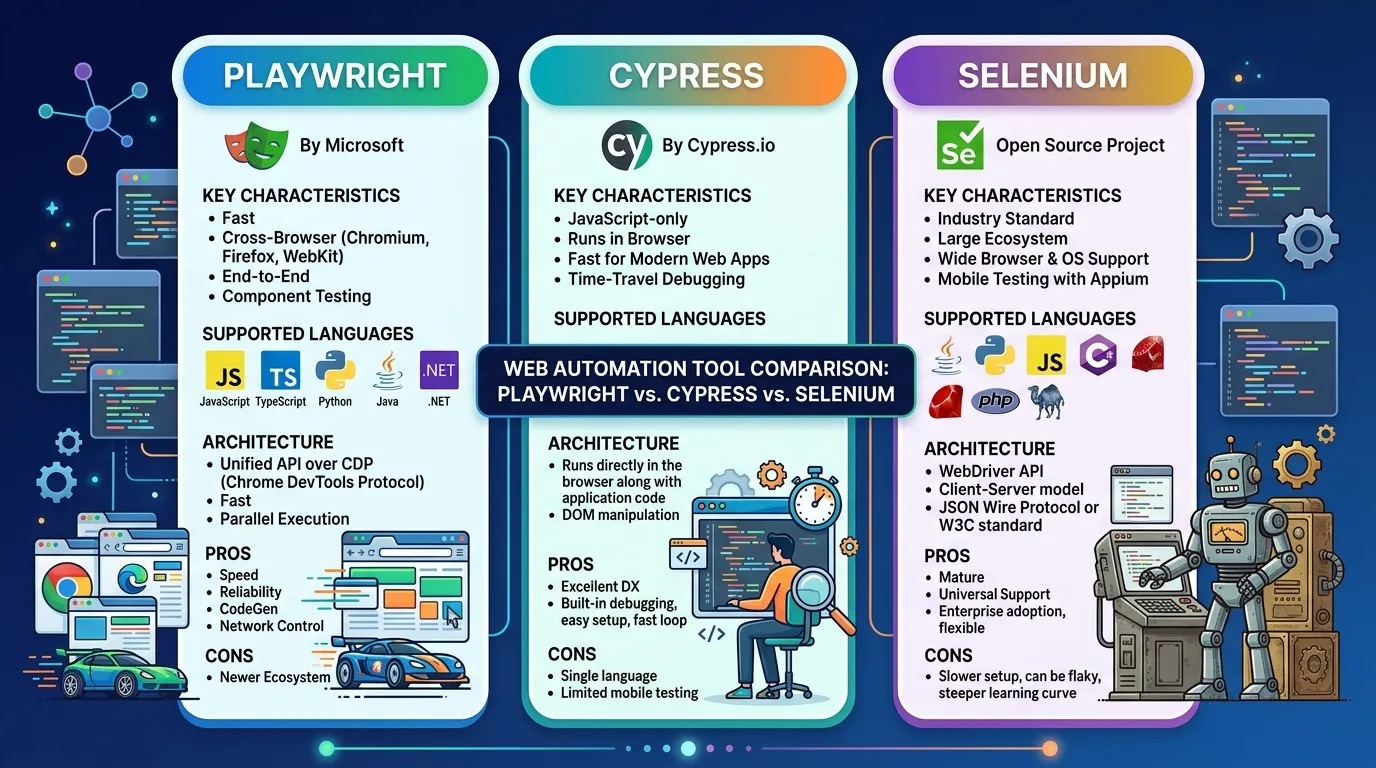
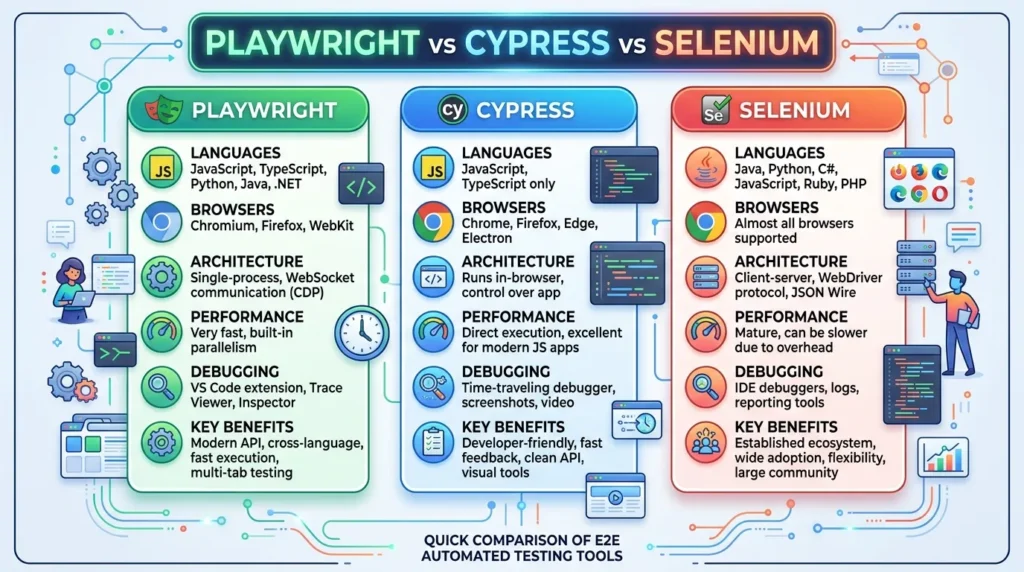
Playwright focuses on modern cross-browser automation and includes its own test runner for JavaScript and TypeScript. Cypress is closely integrated with the web development workflow and is especially popular with JavaScript and TypeScript teams. Selenium is the long-established WebDriver-based choice with broad language and browser ecosystem support.
So, which one should you choose?
For a new end-to-end testing project, Playwright is often the strongest starting point when you need broad browser coverage, parallel execution, modern debugging, and support for several programming languages. Cypress can be a better fit for teams that want a frontend-focused developer experience, while Selenium remains a strong choice for established enterprise test suites and teams that depend on its mature WebDriver ecosystem.
Let’s compare them feature by feature.
Playwright vs Cypress vs Selenium: Quick Comparison
| Feature | Playwright | Cypress | Selenium |
|---|---|---|---|
| Primary focus | Modern browser automation | Web testing and developer experience | Browser automation standard |
| JavaScript/TypeScript | Yes | Yes | Yes |
| Python | Yes | No | Yes |
| Java | Yes | No | Yes |
| C#/.NET | Yes | No | Yes |
| Ruby | No official Playwright language binding | No | Yes |
| Chromium | Yes | Yes | Yes |
| Firefox | Yes | Yes | Yes |
| WebKit | Yes | Yes, with current support | Through browser ecosystem |
| Mobile device emulation | Yes | Yes | Depends on setup |
| Auto-waiting | Yes | Yes | Requires more explicit synchronization |
| Parallel execution | Built into Playwright Test | Available, including Cypress Cloud orchestration | Commonly handled through Grid or CI infrastructure |
| Network interception | Yes | Yes | Usually requires additional tooling or APIs |
| API testing | Built in | Supported | Usually combined with other tools |
| Test runner | Playwright Test for Node.js | Cypress runner | Usually combined with JUnit, TestNG, pytest, NUnit, etc. |
| Best fit | New cross-browser projects | Frontend-focused teams | Enterprise and established automation ecosystems |
The exact capabilities depend on the language, browser, version, and surrounding infrastructure, so this table should be treated as a practical overview rather than a substitute for each tool’s documentation. Playwright officially supports JavaScript/TypeScript, Python, Java, and .NET, while Cypress is centered on JavaScript/TypeScript.
What Is Playwright?
Playwright is an open-source browser automation framework developed by Microsoft.
It is designed for modern web applications and can automate Chromium, Firefox, and WebKit. Playwright can also run tests against branded versions of Chrome and Edge and emulate selected mobile and tablet devices.
One of its major advantages is that browser automation and test tooling are designed to work together. Playwright Test for Node.js includes features such as parallel execution, HTML reporting, tracing, and screenshot assertions.
Why developers choose Playwright
Playwright is attractive when a team needs:
- Cross-browser testing
- Parallel test execution
- Automatic waiting
- Network interception
- Multiple browser contexts
- API testing
- Screenshots and video
- Trace-based debugging
- Mobile device emulation
Playwright tests can be scaffolded quickly using its CLI and codegen tools, which generate starter tests in TypeScript, JavaScript, Python, Java, or .NET.
Playwright projects can define separate configurations for Chromium, Firefox, WebKit, Chrome, Edge, and emulated mobile devices.
This makes it particularly useful for applications where browser compatibility is an important part of the testing strategy.
What Is Cypress?
Cypress takes a different approach.
Cypress runs closely alongside the application being tested. Its architecture is designed to give the test runner direct access to the application and browser environment, which is one reason its interactive debugging experience is a major part of its appeal.
Cypress supports end-to-end testing and component testing and is particularly comfortable for frontend developers who already work heavily with JavaScript or TypeScript.
Its interactive runner lets developers watch commands execute and inspect what happened when a test fails.
Cypress describes its architecture as running in the same run loop as the application, with a Node server process that communicates with the browser to provide automatic waiting, network control, time travel, and integrated component and accessibility testing. For a detailed explanation of this approach, see Why Cypress?.
Why developers choose Cypress
Cypress can be a good choice when you want:
- A strong interactive test runner
- Easy frontend testing
- Component testing
- JavaScript or TypeScript
- Network stubbing
- Screenshots and videos
- Clear local debugging
- A workflow that feels familiar to frontend developers
Cypress currently supports Chrome-family browsers, Firefox, and WebKit, with the exact browser support depending on the current Cypress version and configuration.
Cypress also supports distributing recorded tests across multiple machines through its cloud-based orchestration features.
What Is Selenium?
Selenium is one of the most established names in browser automation.
For an official overview of Selenium’s components, including WebDriver, Grid, IDE, and best practices, see the Selenium documentation. Teams commonly combine Selenium with a separate test framework, reporting system, CI platform, and other testing libraries.
This flexibility is one of Selenium’s biggest strengths.
A team might write Selenium tests in Java with TestNG, Python with pytest, or C# with NUnit. That makes Selenium especially attractive to organizations that already have established automation infrastructure.
Why teams continue to use Selenium
Selenium remains useful when:
- An organization already has a large Selenium test suite
- Multiple programming languages are required
- Existing Selenium Grid infrastructure is important
- The team has extensive WebDriver experience
- Browser and device infrastructure is already built around Selenium
- Migration costs would outweigh the benefits of switching
The biggest mistake is assuming that an older technology automatically becomes a bad technology. Selenium’s maturity and ecosystem can be more important than having the newest developer experience.
Playwright vs Cypress vs Selenium: Architecture
Architecture is one of the biggest differences between these tools.
Cypress explains that traditional browser automation tools such as Selenium generally operate outside the browser and send remote commands, while Cypress runs in the same run loop as the application and communicates with a Node.js process.
Playwright takes a different modern browser-automation approach and directly manages browser processes and contexts.
Selenium uses the WebDriver ecosystem, where the test communicates with a browser through the standardized WebDriver model.
These architectural differences affect how each tool handles:
- Browser communication
- Multiple tabs
- Windows
- Frames
- Authentication
- Network requests
- Synchronization
- Parallel execution
- Debugging
This is why comparing tools only by syntax can be misleading.
The real question is:
Which architecture fits the application and testing environment your team needs to support?
Playwright vs Cypress vs Selenium: Browser Support
Browser coverage is one of the most important considerations for end-to-end testing.
Playwright can run tests against Chromium, Firefox, and WebKit. It can also test branded Chrome and Edge installations and emulate mobile and tablet devices.
Cypress supports Chrome-family browsers and Firefox, along with WebKit support in its current browser ecosystem.
Selenium has a broad browser ecosystem through WebDriver implementations and remains a common choice when organizations have complex browser infrastructure.
Which is best for cross-browser testing?
For a new project that needs to test Chromium, Firefox, and WebKit from one framework, Playwright is a particularly strong option.
Playwright’s project configuration lets you define different browsers and devices and then run the same test suite against those configurations.
One important distinction is worth remembering: Playwright’s WebKit testing is not the same thing as running Apple’s branded Safari browser. Playwright documents that its WebKit build is derived from WebKit sources and is not the branded Safari application.
If your test strategy requires real Safari on Apple hardware, you should evaluate your infrastructure separately rather than assuming WebKit testing is identical to Safari testing.
Playwright vs Cypress vs Selenium: Programming Languages
Programming-language support can immediately narrow down your options.
Playwright officially provides bindings for:
- JavaScript
- TypeScript
- Python
- Java
- .NET
Its Node.js implementation includes the Playwright Test runner, while Python, Java, and .NET integrate with their respective testing ecosystems.
Cypress is primarily designed around JavaScript and TypeScript.
Selenium has long been attractive to teams working across several languages.
Which should you choose?
If your team is already strong in TypeScript, Playwright and Cypress are both natural choices.
If you have Python, Java, or .NET teams, Playwright becomes more attractive because it supports those languages.
If your organization already has a large Selenium framework written in Java, Python, C#, or another supported ecosystem, replacing it purely because another framework is newer may not make financial or technical sense.
Playwright vs Cypress vs Selenium: Speed and Performance
Performance comparisons are tricky.
You will often find articles claiming that one framework is “the fastest,” but benchmark results can change depending on:
- Application size
- Number of tests
- Browser
- CI hardware
- Network conditions
- Test design
- Number of workers
- Authentication strategy
- Database state
- Screenshots and video
- Parallelization
For that reason, a benchmark from someone else’s project should not automatically determine your framework choice.
Playwright has strong support for parallel execution. Playwright Test runs test files across worker processes, and those workers can run at the same time.
Cypress also supports parallelization across multiple CI machines through its cloud orchestration features.
Selenium can scale horizontally through infrastructure such as Selenium Grid.
The practical lesson is simple:
The fastest framework on paper may not produce the fastest pipeline for your team.
Your CI configuration and test architecture matter just as much as the automation library.
Playwright vs Cypress vs Selenium: Auto-Waiting and Test Stability
Flaky tests are one of the biggest problems in browser automation.
A flaky test may pass ten times and then fail because an element wasn’t ready, a request took longer than expected, or the application had not finished rendering.
Playwright and Cypress both provide automatic waiting behavior that reduces the need for arbitrary delays.
This matters because code such as:
wait 3 seconds
click button
doesn’t really know whether the application is ready.
If the application becomes ready in 500 milliseconds, the test wastes time.
If it becomes ready in 4 seconds, the test may fail.
A better testing framework waits for relevant conditions rather than relying heavily on fixed delays.
Selenium can certainly support reliable synchronization, but teams often need to be more deliberate about explicit waits and synchronization strategies.
That means framework choice alone doesn’t eliminate flaky tests. Good test design remains essential.
Playwright vs Cypress vs Selenium: Debugging
Debugging can determine how quickly a team can fix failed tests.
Playwright includes tracing, HTML reports, screenshots, and video, which help teams diagnose failures in CI and locally.
Cypress is known for its interactive local testing experience. Developers can watch commands execute and inspect application behavior during a test run. Its architecture gives Cypress close access to both the application and browser environment.
Selenium’s debugging experience depends more heavily on the surrounding framework and infrastructure. Teams often combine logs, screenshots, videos, browser capabilities, and reporting tools to create a complete debugging workflow.
Winner for debugging?
There isn’t a universal winner.
Cypress is particularly attractive for interactive local debugging.
Playwright is particularly strong for automated test diagnostics and trace-based investigation.
Selenium can provide excellent diagnostics when integrated into a mature enterprise testing platform.
Playwright vs Cypress vs Selenium: Parallel Testing
Large test suites can become painfully slow when everything runs sequentially.
Playwright Test supports parallel execution through worker processes. Test files run in parallel by default, while tests within a file normally run in order unless configured differently.
Cypress supports parallelization across multiple CI machines through Cypress Cloud when tests are recorded and configured for that workflow.
Selenium can scale tests using Selenium Grid and other distributed execution setups.
This creates an important distinction.
Playwright
Parallel execution is closely integrated into the Playwright Test experience.
Cypress
Parallel execution can work well, particularly when using its cloud orchestration capabilities.
Selenium
Parallel execution is highly flexible but usually requires more infrastructure decisions.
For a new team that wants parallel testing without building a large automation infrastructure first, Playwright is often the simplest starting point.
Playwright vs Cypress vs Selenium: API Testing
Modern applications often depend heavily on APIs.
That means browser testing isn’t always enough.
Playwright’s robust network interception makes it a preferred framework when building autonomous agents via tools like Cline vs Cursor to execute browser actions and validate API responses simultaneously.
Cypress also supports API-oriented testing and network interception.
Selenium itself is primarily a browser automation tool, so teams commonly pair it with other libraries when they need extensive API testing.
This is another area where Playwright and Cypress can provide a more integrated experience for modern web testing.
Playwright vs Cypress vs Selenium: Mobile Testing
None of these tools should automatically be treated as a replacement for a full real-device mobile testing strategy.
Playwright can emulate mobile and tablet configurations, including device characteristics and browser behavior.
Cypress can also test web applications at mobile viewport sizes and supports mobile-oriented browser testing configurations.
Selenium can be paired with mobile automation technologies when testing native or hybrid mobile applications.
This distinction matters:
Mobile browser emulation is not the same as testing a real Android or iOS device.
If your main goal is responsive web testing, browser automation may be enough.
If you need native-app testing or real-device coverage, you’ll need a broader mobile testing strategy.
Playwright vs Cypress vs Selenium: Learning Curve
Cypress is often approachable for frontend developers because its syntax and workflow fit naturally into JavaScript and TypeScript projects.
Playwright is also relatively approachable, especially for developers who already know JavaScript or TypeScript. Its API is broad, though, and teams need time to learn concepts such as browser contexts, fixtures, projects, traces, and test isolation.
Selenium can have a steeper initial learning curve because the framework is often only one component of the overall automation stack.
However, there’s another side to the argument.
If your organization already has Selenium expertise, Selenium may be easier for your team than introducing a new framework.
So don’t ask only:
“Which framework is easiest?”
Ask:
“Which framework is easiest for our team to maintain for the next few years?”
Playwright vs Cypress vs Selenium: CI/CD
All three can be integrated into CI/CD pipelines.
The differences are mainly about how much infrastructure you want to manage yourself.
Playwright’s test runner supports parallel workers and browser projects, which makes it well suited to CI environments.
Cypress provides documentation and tooling around CI execution and distributed test runs.
When provisioning headless test runners and Docker hosts, ensure your CI environment has the required browsers, dependencies, and permissions for the chosen framework.
For teams building a new pipeline, Playwright can offer a more integrated experience.
For organizations with an existing Selenium Grid, however, continuing with Selenium may be the simpler option.
Playwright vs Cypress vs Selenium: Pros and Cons
Playwright
Pros
- Strong cross-browser support
- Chromium, Firefox, and WebKit
- Multiple programming languages
- Built-in parallel execution
- Automatic waiting
- Browser contexts
- Network interception
- API testing
- Trace viewer
- Strong CI support
- Mobile device emulation
Cons
- More concepts to learn than a simple browser test library
- WebKit testing is not identical to testing branded Safari
- Teams need to keep browser binaries and Playwright versions aligned
- Existing Selenium teams may face migration costs
Cypress
Pros
- Excellent developer experience
- Strong interactive runner
- JavaScript and TypeScript support
- Component testing
- Network stubbing
- Good local debugging
- Easy frontend integration
- Strong documentation and ecosystem
Cons
- Primarily focused on JavaScript/TypeScript
- Some browser automation scenarios require understanding Cypress’s architecture and limitations
- Large-scale parallel execution can depend on Cypress Cloud workflows
- Teams with requirements outside frontend-oriented web testing may prefer a broader automation framework
Selenium
Pros
- Mature ecosystem
- Broad language support
- WebDriver standard
- Large enterprise adoption
- Flexible architecture
- Selenium Grid for distributed testing
- Strong compatibility with established testing infrastructure
Cons
- More infrastructure can be required
- Synchronization often needs careful handling
- Debugging experience depends heavily on the surrounding stack
- Test development can feel more verbose
- New teams may find modern frameworks easier to start with
Which Is Better: Playwright, Cypress, or Selenium?
There is no single winner for every project.
Instead, the right choice depends on your application’s architecture, team skills, browser requirements, existing automation infrastructure, and long-term maintenance plans.
Choose Playwright if:
- You’re starting a new automation project.
- You need Chromium, Firefox, and WebKit testing.
- You want built-in parallel execution.
- Your team uses TypeScript, JavaScript, Python, Java, or .NET.
- You want browser, API, and network testing in one ecosystem.
- You need strong CI support.
- You want modern test diagnostics.
Playwright is a particularly strong default for new cross-browser web automation projects.
Choose Cypress if:
- Your team is primarily frontend-focused.
- JavaScript or TypeScript is your main language.
- Developer experience is a major priority.
- You want component testing.
- You value interactive local debugging.
- Your application is heavily browser-based and frontend-oriented.
Cypress can be an excellent choice when the testing workflow needs to feel close to everyday frontend development.
Choose Selenium if:
- You already have a large Selenium suite.
- Your organization has strong Selenium expertise.
- You need several programming languages.
- Selenium Grid is already part of your infrastructure.
- Migration would require rewriting hundreds or thousands of existing tests.
- Your organization depends on a mature WebDriver-based ecosystem.
In these situations, Selenium’s maturity can be a major advantage rather than a disadvantage.
Playwright vs Cypress vs Selenium: Our Verdict
If you’re choosing a framework for a new web automation project in 2026, Playwright is the strongest general-purpose choice of the three for many teams.
Its combination of browser coverage, programming-language support, parallel execution, automatic waiting, browser contexts, API capabilities, and debugging tools gives it a strong balance between developer experience and testing flexibility. Playwright’s official documentation confirms support for Chromium, Firefox, WebKit, branded Chrome and Edge, and device emulation.
But that doesn’t make Cypress or Selenium obsolete.
Cypress remains compelling for frontend teams that value an interactive testing workflow and component testing.
Selenium remains highly relevant for enterprises with mature automation systems, broad language requirements, and existing WebDriver infrastructure.
The best framework is therefore not necessarily the one with the most features.
It’s the one your team can write, debug, run, and maintain reliably over the life of the product.
For an independent, high-level comparison of architecture, performance, cross-browser support, mobile strategy, and total cost of ownership, see this Selenium vs. Cypress vs. Playwright overview
Final Comparison
| If your priority is… | Recommended choice |
|---|---|
| New web automation project | Playwright |
| Cross-browser testing | Playwright |
| Chromium + Firefox + WebKit | Playwright |
| TypeScript/JavaScript automation | Playwright or Cypress |
| Frontend developer experience | Cypress |
| Component testing | Cypress |
| Existing enterprise automation | Selenium |
| Large existing Selenium suite | Selenium |
| Multiple programming languages | Playwright or Selenium |
| Built-in parallel test execution | Playwright |
| Interactive local test runner | Cypress |
| Mature WebDriver ecosystem | Selenium |
Frequently Asked Questions
Is Playwright better than Selenium?
For many new web automation projects, yes. Playwright provides a modern integrated testing experience, strong cross-browser support, parallel execution, automatic waiting, and support for several programming languages.
However, Selenium can be the better choice when a company already has substantial Selenium infrastructure or requires a mature WebDriver-based ecosystem.
Is Cypress better than Playwright?
Not universally.
Cypress can be an excellent choice for JavaScript and TypeScript frontend teams that value its interactive runner and component testing workflow. Playwright is generally more flexible when you need multiple languages, broad browser coverage, and integrated parallel browser testing.
Should I learn Playwright or Selenium in 2026?
If you’re starting from scratch and want to specialize in modern web automation, Playwright is a strong first choice.
If you’re applying for jobs where Selenium is heavily used, learning Selenium remains valuable because many organizations still maintain large Selenium-based test suites.
Can Playwright replace Selenium?
Technically, Playwright can replace Selenium for many web testing scenarios, but migration is not always worth doing.
If your existing Selenium suite is stable and your team has strong Selenium expertise, the cost of rewriting tests may exceed the benefits.
Can Cypress replace Playwright?
Cypress can replace Playwright for many frontend-focused web testing projects, but the tools have different strengths.
If you need multiple programming languages, broad browser automation, or specific browser-control capabilities, Playwright may be a better fit.
Which tool is fastest?
There is no universal speed winner.
Execution time depends on the application, test design, browser, CI hardware, number of workers, network conditions, and configuration.
Rather than relying on a generic benchmark, run a small proof-of-concept using your own application’s most important tests.
Final Recommendation
For a new project, start by evaluating Playwright.
If your team is strongly centered on frontend JavaScript/TypeScript development and wants an interactive testing workflow, evaluate Cypress alongside it.
If you’re working within an established enterprise Selenium environment, don’t dismiss Selenium simply because newer tools exist.
The real decision isn’t just Playwright vs Cypress vs Selenium.
It’s about which tool gives your team the best combination of browser coverage, developer experience, test reliability, CI performance, and long-term maintenance.